andrew kim / projects / ti-32
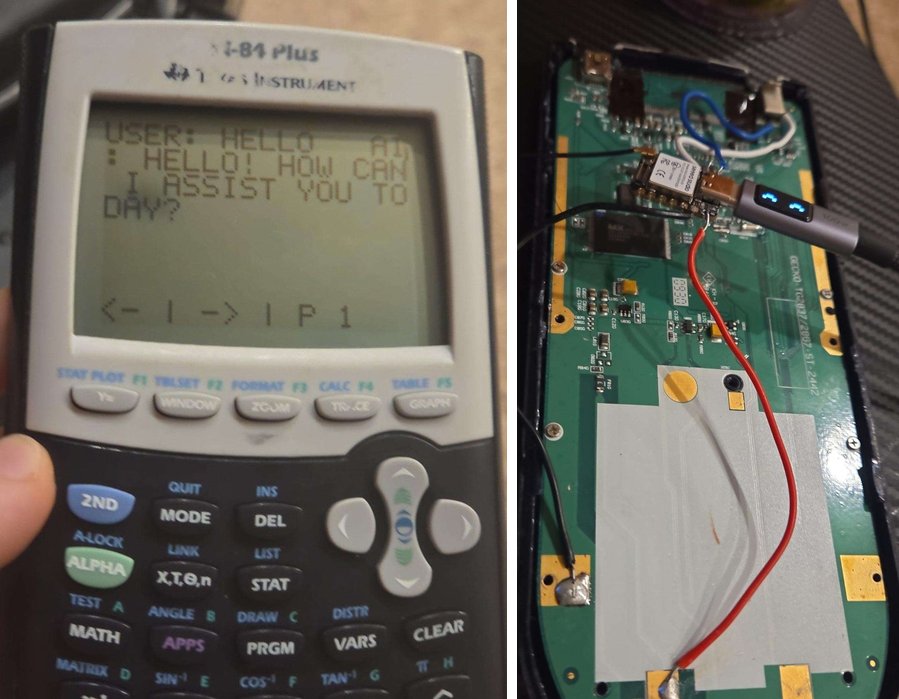
a ti-84 that can ask an ai. it's my build of chromalock's ti-32. an esp32 inside the calculator connects to wifi and talks to a server, so a program on the calculator can send a question and show the answer on screen. i skipped their pcb and soldered the esp32 straight into the calculator's circuit.
i've never used it on a test.
my server
chromalock's repo comes with its own server. i wrote a smaller one. it takes the question from the calculator, asks an openai model with a prompt that keeps answers short enough for the screen, and sends back plain text, since that's what the calculator side expects.
const client = new OpenAI({ apiKey: process.env.TI32_OPENAI_KEY });
const PORT = process.env.PORT || 8000;
const MODEL = process.env.MODEL || 'gpt-4.1-mini';
const SYSTEM_PROMPT = 'You are a concise advanced math, calculus, language arts, and computer science assistant. Show steps clearly but keep answers short enough to fit on a TI-84-sized screen.';

app.get('/gpt/ask', async (req, res) => {
  const question = (req.query.question || '').toString().trim();
  if (!question) return res.status(400).type('text/plain').send('no question');

  try {
    const completion = await client.chat.completions.create({
      model: MODEL,
      messages: [
        { role: 'system', content: SYSTEM_PROMPT },
        { role: 'user', content: question },
      ],
      max_tokens: 400,
    });
    const reply = completion.choices[0]?.message?.content?.trim() || 'no response';
    console.log(`q: ${question}\na: ${reply}`);
    res.type('text/plain').send(reply);
  } catch (err) {
    console.error(err);
    res.status(500).type('text/plain').send('error talking to gpt');
  }
});

app.listen(PORT, () => console.log(`listening on ${PORT}`));
download the server (12 kb zip)