andrew kim / projects / careclock
a medication reminder web app i made with nathaniel nam, only for the congressional app challenge. it installs on a phone like an app, works offline, and warns when two medicines' fda labels mention each other.
try the demo (sample data, nothing to sign up for).
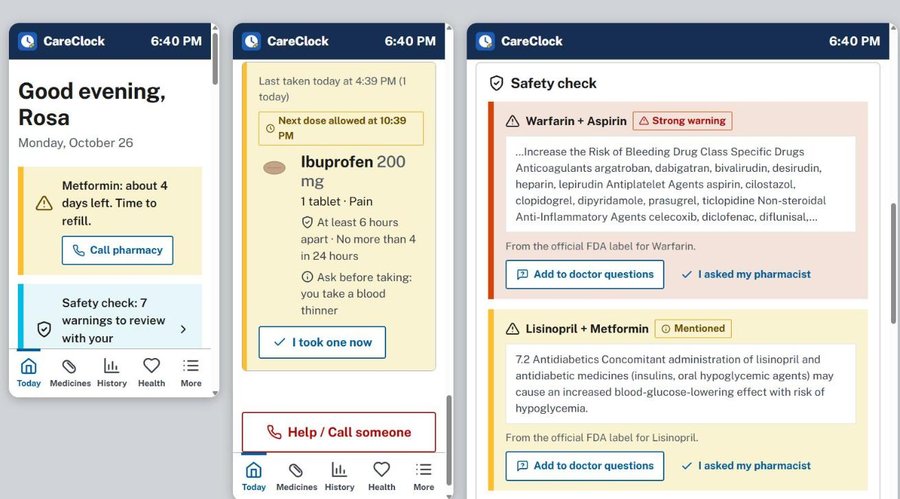
matching two labels
the safety check reads real fda labels from openfda. the obvious way to do it doesn't work. a label almost never names the other drug you're taking, because it talks about classes instead, so searching aspirin's label for the word warfarin finds nothing while the warning sits right there under anticoagulants.
so each medicine gets expanded into the words a label would actually use. warfarin becomes anticoagulant and blood thinner, anything ending in pril becomes ace inhibitor, anything ending in statin becomes statin. salt and dosage-form suffixes get stripped first, so potassium chloride and metoprolol succinate don't come through as potassium and succinate.
const CLASS_TERMS = [
  [/warfarin|apixaban|rivaroxaban|dabigatran|heparin/, ['anticoagulant', 'blood thinner']],
  [/aspirin|ibuprofen|naproxen|celecoxib|diclofenac/, ['nsaid', 'nonsteroidal anti-inflammatory']],
  [/pril$/,   ['ace inhibitor', 'angiotensin converting enzyme']],
  [/statin$/, ['statin', 'hmg-coa reductase']],
  ...
];

const own = new Set(termsFor(A));
const hit = findMention(text, termsFor(B).filter((t) => !own.has(t)));it checks both directions, since only one of the two labels usually carries the warning. a hit whose surrounding text contains contraindicated, fatal or bleeding is marked strong and sorted to the top. it is a text search over labels and not a drug interaction database, which is exactly what the app tells you it is.
making a web page ring
an alarm is the part a web app is worst at. a browser won't let a page make noise until the person has touched it, so the audio context gets built on the first pointerdown and not before. the chime is three sine tones rather than a file, because a file is another thing to load and another thing to get wrong offline.
const REPEAT_MIN = 15;
const GIVE_UP_MIN = 120;

[659, 784, 1047].forEach((f, i) => {
  const o = audio.createOscillator();
  o.frequency.value = f;
  g.gain.exponentialRampToValueAtTime(0.5, t0 + i * 0.35 + 0.03);
  g.gain.exponentialRampToValueAtTime(0.0001, t0 + i * 0.35 + 0.9);
});
a closed tab can't run a timer either, so the same alert goes out through the service worker as a notification that won't dismiss itself. the loop checks every fifteen seconds, nags again after fifteen minutes, and stops after two hours, because an alarm still going four hours later is just noise.
download the code (418 kb zip)